로컬 처리

앱 아이콘 생성기

앱 아이콘 생성기 turns one logo or icon image into common iOS, Android, and PWA app icon sizes with rounded preview, safe-area preview, ZIP export, and manifest icon JSON.

Runs locallyNo uploadYour input is processed in your browser.

앱 아이콘 생성기

PNG, JPG, WebP, SVG에서 iOS, Android, PWA 아이콘 크기를 만들고 안전 영역과 둥근 모서리를 미리 봅니다.

이 도구란?

An app icon generator converts one brand mark, logo, or square artwork into the multiple icon sizes required by mobile apps, Android launchers, and installable web apps. It helps teams export a consistent icon set without sending design files to a server.

지원 입력 형식

  • PNG images
  • JPG and JPEG images
  • WebP images
  • SVG logos and icons
  • Square source artwork is recommended
  • Large files should be kept under 10 MB for smooth browser processing

출력 파일

  • app-icon-ios-20.png
  • app-icon-ios-29.png
  • app-icon-ios-40.png
  • app-icon-ios-60.png
  • app-icon-ios-76.png
  • app-icon-ios-83-5.png exported at 167x167
  • app-icon-ios-1024.png
  • Android and PWA icons from 48x48 to 512x512
  • lumatool-app-icon-pack.zip

크기 가이드

  • 20x20, 29x29, 40x40, 60x60, 76x76: common iOS slots.
  • 167x167: iPad Pro 83.5pt icon export.
  • 1024x1024: high-resolution App Store style source.
  • 48x48, 72x72, 96x96, 144x144: Android launcher sizes.
  • 192x192 and 512x512: PWA manifest icons.

입력 예시

  • Company logo PNG
  • Personal blog avatar
  • SaaS product mark
  • SVG logo
  • Transparent square icon

출력 예시

  • app-icon-ios-20.png
  • app-icon-ios-29.png
  • app-icon-ios-40.png
  • app-icon-ios-60.png
  • app-icon-ios-76.png
  • app-icon-ios-83-5.png exported at 167x167

일반 사용 사례

  • Export a starter icon pack for iOS, Android, and PWA projects.
  • Check rounded-corner and safe-area behavior before app handoff.
  • Generate web manifest icon JSON for installable web apps.
  • Prepare launcher icon sizes from one source logo.
  • Compare platform-specific outputs before sending files to developers.

권장 방법

  • Start from high-resolution square artwork when possible.
  • Keep the subject centered and avoid tiny text inside small icons.
  • Use transparent backgrounds only when the mark remains visible on light and dark surfaces.
  • Use consistent file paths between exported files and HTML code.
  • After replacing favicons, clear browser cache or change filenames if the old icon remains visible.

흔한 실수

  • Uploading a low-resolution source and expecting sharp large icons.
  • Using artwork that touches the edge and gets clipped after rounding or cover mode.
  • Shipping only favicon.ico and forgetting Apple Touch Icon or manifest icons.
  • Leaving HTML paths that do not match the files in the public folder.
  • Not previewing 16x16 and 32x32 outputs before release.

개인정보 및 로컬 처리

파일은 브라우저에서 로컬로 처리되며 LumaTool 서버에 업로드되지 않습니다. 이미지 디코딩, Canvas 크기 조정, ICO/ZIP, manifest, HTML 생성은 클라이언트에서 완료됩니다.

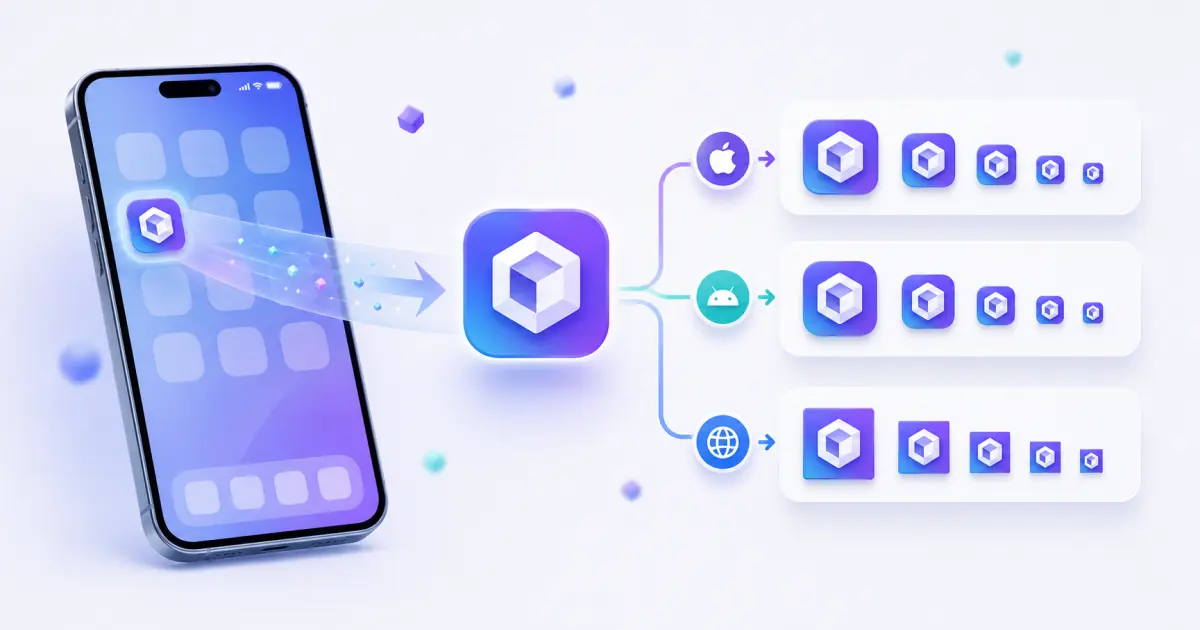
예시

입력 예시

입력 예시
Company logo PNG
Personal blog avatar
SaaS product mark
출력 예시
app-icon-ios-20.png
app-icon-ios-29.png
app-icon-ios-40.png

앱 아이콘 생성기 turns one logo or icon image into common iOS, Android, and PWA app icon sizes with rounded preview, safe-area preview, ZIP export, and manifest icon JSON.

출력 예시

입력 예시
one source icon image
출력 예시
app-icon-ios-20.png
app-icon-ios-29.png
app-icon-ios-40.png
app-icon-ios-60.png
app-icon-ios-76.png

파일은 브라우저에서 로컬로 처리되며 LumaTool 서버에 업로드되지 않습니다. 이미지 디코딩, Canvas 크기 조정, ICO/ZIP, manifest, HTML 생성은 클라이언트에서 완료됩니다.

개인정보 안내

파일은 브라우저에서 로컬로 처리되며 LumaTool 서버에 업로드되지 않습니다. 이미지 디코딩, Canvas 크기 조정, ICO/ZIP, manifest, HTML 생성은 클라이언트에서 완료됩니다.

사용 방법

  1. 1단계. 이미지를 업로드하거나 아이콘 경로를 입력합니다.
  2. 2단계. 웹사이트, 앱, PWA에 맞는 출력 옵션을 선택합니다.
  3. 3단계. 미리보기, 생성 파일, manifest, HTML 코드를 확인합니다.
  4. 4단계. 개별 파일, ZIP 또는 생성 코드를 사용합니다.

실제 사용 예시

Export a starter icon pack for iOS, Android, and PWA projects

Export a starter icon pack for iOS, Android, and PWA projects.

Check rounded-corner and safe-area behavior before app handoff

Check rounded-corner and safe-area behavior before app handoff.

Generate web manifest icon JSON for installable web apps

Generate web manifest icon JSON for installable web apps.

주요 사용 사례

  • Export a starter icon pack for iOS, Android, and PWA projects.
  • Check rounded-corner and safe-area behavior before app handoff.
  • Generate web manifest icon JSON for installable web apps.
  • Prepare launcher icon sizes from one source logo.
  • Compare platform-specific outputs before sending files to developers.

FAQ

What image size should I upload?

A square 1024x1024 image is a strong source because it can scale down cleanly to smaller app icon sizes.

Can I generate both iOS and Android icons?

Yes. Choose all platforms or filter the output to iOS, Android, or PWA.

Does this tool upload my app icon?

아니요. 처리는 브라우저에서 로컬로 실행되며 파일은 LumaTool 서버로 업로드되지 않습니다.

What is the difference between app icon and favicon?

App icons are used by mobile launchers, stores, and installed apps. Favicons are primarily used by websites, browser tabs, bookmarks, and PWA metadata.

Why do I need 192x192 and 512x512 icons?

These are common PWA manifest sizes used for install prompts, launchers, and high-resolution surfaces.

Can I use the generated icons in a PWA?

Yes. Use the Android/PWA PNG files and copy the generated manifest icons JSON into your web manifest.

앱 아이콘 생성기은 어떤 작업에 적합한가요?

앱 아이콘 생성기은 브라우저에서 빠르게 확인, 변환, 정리, 포맷팅해야 하는 아이콘 도구 작업에 적합합니다.

입력 내용은 어떻게 처리되나요?

파일은 브라우저에서 로컬로 처리되며 LumaTool 서버에 업로드되지 않습니다. 이미지 디코딩, Canvas 크기 조정, ICO/ZIP, manifest, HTML 생성은 클라이언트에서 완료됩니다.

관련 도구