Local Processing

App Icon Generator

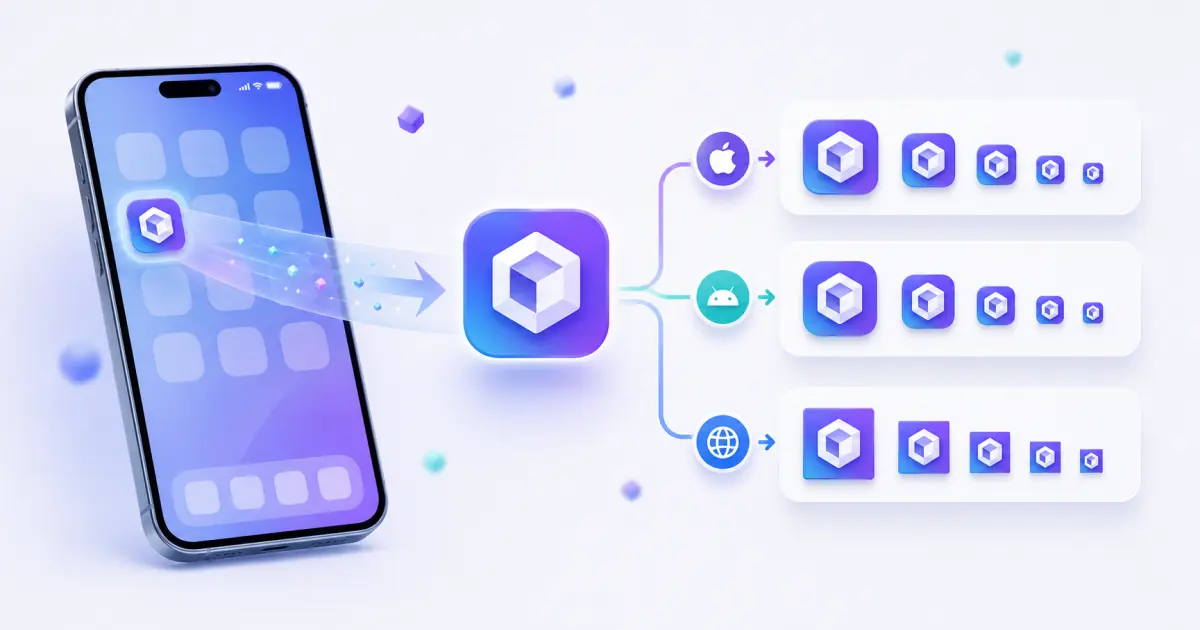
App Icon Generator turns one logo or icon image into common iOS, Android, and PWA app icon sizes with rounded preview, safe-area preview, ZIP export, and manifest icon JSON.

Runs locallyNo uploadYour input is processed in your browser.

App Icon Generator

Generate iOS, Android, and PWA icon sizes from PNG, JPG, WebP, or SVG with safe area and rounded-corner previews.

What is this tool?

An app icon generator converts one brand mark, logo, or square artwork into the multiple icon sizes required by mobile apps, Android launchers, and installable web apps. It helps teams export a consistent icon set without sending design files to a server.

Supported input formats

  • PNG images
  • JPG and JPEG images
  • WebP images
  • SVG logos and icons
  • Square source artwork is recommended
  • Large files should be kept under 10 MB for smooth browser processing

Output files

  • app-icon-ios-20.png
  • app-icon-ios-29.png
  • app-icon-ios-40.png
  • app-icon-ios-60.png
  • app-icon-ios-76.png
  • app-icon-ios-83-5.png exported at 167x167
  • app-icon-ios-1024.png
  • Android and PWA icons from 48x48 to 512x512
  • lumatool-app-icon-pack.zip

Size guide

  • 20x20, 29x29, 40x40, 60x60, 76x76: common iOS slots.
  • 167x167: iPad Pro 83.5pt icon export.
  • 1024x1024: high-resolution App Store style source.
  • 48x48, 72x72, 96x96, 144x144: Android launcher sizes.
  • 192x192 and 512x512: PWA manifest icons.

Input examples

  • Company logo PNG
  • Personal blog avatar
  • SaaS product mark
  • SVG logo
  • Transparent square icon

Output examples

  • app-icon-ios-20.png
  • app-icon-ios-29.png
  • app-icon-ios-40.png
  • app-icon-ios-60.png
  • app-icon-ios-76.png
  • app-icon-ios-83-5.png exported at 167x167

Common use cases

  • Export a starter icon pack for iOS, Android, and PWA projects.
  • Check rounded-corner and safe-area behavior before app handoff.
  • Generate web manifest icon JSON for installable web apps.
  • Prepare launcher icon sizes from one source logo.
  • Compare platform-specific outputs before sending files to developers.

Best practices

  • Start from high-resolution square artwork when possible.
  • Keep the subject centered and avoid tiny text inside small icons.
  • Use transparent backgrounds only when the mark remains visible on light and dark surfaces.
  • Use consistent file paths between exported files and HTML code.
  • After replacing favicons, clear browser cache or change filenames if the old icon remains visible.

Common mistakes

  • Uploading a low-resolution source and expecting sharp large icons.
  • Using artwork that touches the edge and gets clipped after rounding or cover mode.
  • Shipping only favicon.ico and forgetting Apple Touch Icon or manifest icons.
  • Leaving HTML paths that do not match the files in the public folder.
  • Not previewing 16x16 and 32x32 outputs before release.

Privacy and local processing

Your file is processed locally in your browser and is not uploaded to LumaTool servers. Image decoding, canvas resizing, ICO packaging, ZIP creation, manifest generation, and HTML code generation all happen on the client side.

Examples

Input examples

Input example
Company logo PNG
Personal blog avatar
SaaS product mark
Output example
app-icon-ios-20.png
app-icon-ios-29.png
app-icon-ios-40.png

App Icon Generator turns one logo or icon image into common iOS, Android, and PWA app icon sizes with rounded preview, safe-area preview, ZIP export, and manifest icon JSON.

Output examples

Input example
one source icon image
Output example
app-icon-ios-20.png
app-icon-ios-29.png
app-icon-ios-40.png
app-icon-ios-60.png
app-icon-ios-76.png

Your file is processed locally in your browser and is not uploaded to LumaTool servers. Image decoding, canvas resizing, ICO packaging, ZIP creation, manifest generation, and HTML code generation all happen on the client side.

Privacy note

Your file is processed locally in your browser and is not uploaded to LumaTool servers. Image decoding, canvas resizing, ICO packaging, ZIP creation, manifest generation, and HTML code generation all happen on the client side.

How to use

  1. Step 1. Upload or enter the required icon paths.
  2. Step 2. Choose the output options that match your website, app, or PWA workflow.
  3. Step 3. Review the previews, generated files, manifest, or HTML code before downloading.
  4. Step 4. Download individual files, download the ZIP package, or copy the generated code.

Real-world examples

Export a starter icon pack for iOS, Android, and PWA projects

Export a starter icon pack for iOS, Android, and PWA projects.

Check rounded-corner and safe-area behavior before app handoff

Check rounded-corner and safe-area behavior before app handoff.

Generate web manifest icon JSON for installable web apps

Generate web manifest icon JSON for installable web apps.

Common use cases

  • Export a starter icon pack for iOS, Android, and PWA projects.
  • Check rounded-corner and safe-area behavior before app handoff.
  • Generate web manifest icon JSON for installable web apps.
  • Prepare launcher icon sizes from one source logo.
  • Compare platform-specific outputs before sending files to developers.

FAQ

What image size should I upload?

A square 1024x1024 image is a strong source because it can scale down cleanly to smaller app icon sizes.

Can I generate both iOS and Android icons?

Yes. Choose all platforms or filter the output to iOS, Android, or PWA.

Does this tool upload my app icon?

No. Processing runs locally in your browser and the file is not uploaded to LumaTool servers.

What is the difference between app icon and favicon?

App icons are used by mobile launchers, stores, and installed apps. Favicons are primarily used by websites, browser tabs, bookmarks, and PWA metadata.

Why do I need 192x192 and 512x512 icons?

These are common PWA manifest sizes used for install prompts, launchers, and high-resolution surfaces.

Can I use the generated icons in a PWA?

Yes. Use the Android/PWA PNG files and copy the generated manifest icons JSON into your web manifest.

What is App Icon Generator best used for?

App Icon Generator is useful for focused icon tools tasks where you need a quick browser-based result without switching tools.

How is my input handled?

Your file is processed locally in your browser and is not uploaded to LumaTool servers. Image decoding, canvas resizing, ICO packaging, ZIP creation, manifest generation, and HTML code generation all happen on the client side.

Related tools